If the blog is something you take seriously and want to control, the best blogging platform in 2026 is self-hosted WordPress. Oops, spoiler. Below, WordPress goes up against Ghost, Framer, Webflow, Wix and Squarespace on what decides how far a blog can go. That means what you can build, newsletters and paid members, themes, SEO control, what you can take with you when you leave, and what it costs.
One disclosure first: jkdevstudio sells WordPress themes, so we are not neutral. That is why every number below links to its source, and why there is a whole section on what WordPress costs you.
Why start a real blog in 2026?
A blog is where expertise goes when it does not fit into a five-second swipe. Most people get there the moment they realize their knowledge, their experience or simply their stories are worth sharing, like this blog you are reading. Wanting to share is only the start, though. What you publish decides where it should live, and nothing stops you from combining platforms.
The easiest start is video on YouTube, TikTok or Instagram, or posts on Threads, Facebook or X. That kind of blogging is locked into one format that looks almost the same everywhere: talk to a camera, or write something short enough that nobody scrolls past it in five seconds.
Serious expertise and complicated subjects need more room. How often do you see a proper news digest on TikTok, or a careful long read on Threads? Rarely, and when you do, you probably do not trust it. In a time of AI slop, disinformation and general digital madness, where you get information and where you share it says a lot about the content itself. That is the case for a classic blog, in the original sense of the word.
Hosted platform or your own site?
A hosted platform gives you readers on day one and takes control in exchange; your own site gives you control and leaves finding readers to you. Before you choose any software, there are five roads: Medium, Substack, Reddit or Quora, existing outlets, or your own site.
- Medium
- An audience, paid by member reading time
- Substack
- Free to start, 10% of paid subscriptions
- Reddit, Quora
- Reach, on pages you do not own
- Existing outlets
- Their readers, their rules
- Your own site
- Full control, your readers to find
Medium pays its partners mainly by paying members’ reading time and engagement on paywalled stories (Medium Help Center). Substack is free until you charge, then keeps 10% of paid subscriptions plus Stripe fees (Substack support), and it does let you export your posts and your email list.

What this comparison counts
The comparison sticks to fundamentals: what you can build, newsletters and members, themes, SEO control, export and cost. Server setup, hosting and a domain name are left out on purpose, because they decide how hard it is to get started, not how good the platform is once you are in.
Why WordPress is still the best blogging platform
WordPress wins because it lets you build a blog of any size and keep everything you publish, and it was made for this job. Matt Mullenweg decided to fork the abandoned b2 blogging software in January 2003, and WordPress 0.7 shipped on May 27, 2003 (WordPress.org history). In my view it was the first blogging platform that worked properly, and it still is.
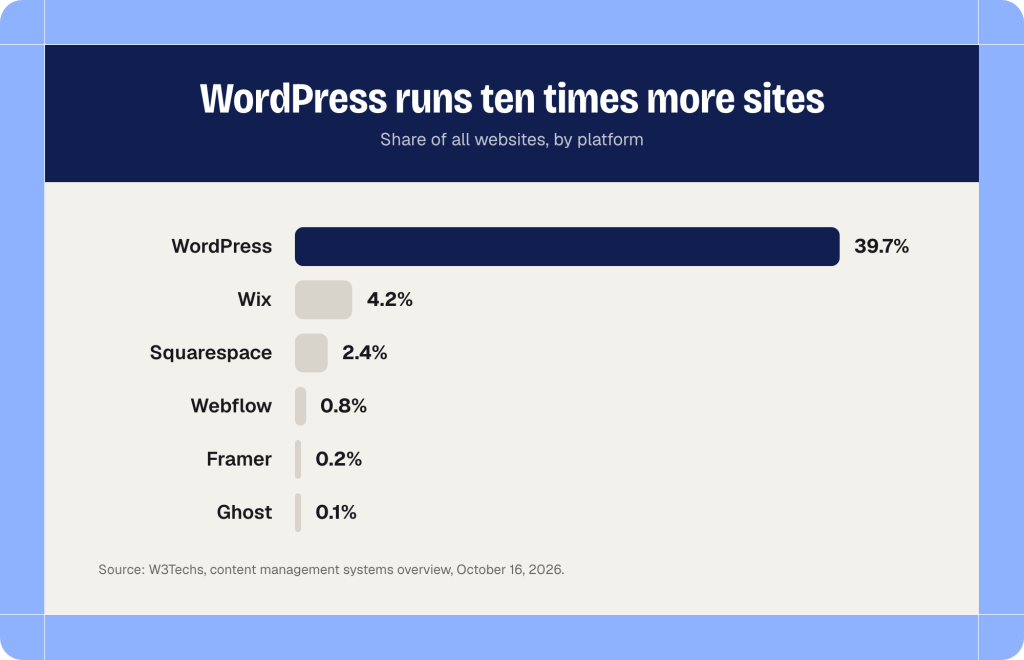
It also runs more websites than any other CMS. W3Techs counts WordPress on 39.7% of all websites and 58.4% of sites with a known CMS, as of October 16, 2026. On the same W3Techs overview, Wix has 4.2%, Squarespace 2.4%, Webflow 0.8%, Framer 0.2% and Ghost 0.1%.
The bigger reason is freedom. The same software runs a niche personal blog, a magazine or a full news site, with a store attached and a stock market widget in the sidebar. Add an admin panel that can email the president and turn your CMS into a Boeing cockpit. The last two are jokes, of course.
Newsletters and members are plugins, not a plan upgrade. Jetpack Newsletter is free with unlimited subscribers and takes 10% of paid subscriptions on the free Jetpack plan, or 2% on the Complete plan. Paid Memberships Pro has a free, open source core. And when you leave, Tools > Export writes your posts, pages, comments, custom fields, categories, tags and users into one WXR file that another site can import (WordPress documentation).
I have worked with WordPress for more than 10 years, and here is the one thing I am sure of. For blogging, the competition can show better design and an easier start, and nothing else. That is exactly where many people get fooled.
Framer vs WordPress, and Webflow too
Framer and Webflow build beautiful sites, but as blogging platforms they run out of road soon after launch. Open either template marketplace and the blog templates look great: editorial layouts, animations, page transitions that feel like an app, and the little Made in Framer or Made in Webflow badge in the corner. Next to that, the WordPress block editor looks ancient. Webflow, for example, lists nine blog templates at $29 to $129; Framer blog templates run from free to $149.
The euphoria lasts about ten minutes after launch:
- Need a newsletter? Neither platform sends newsletters. Webflow points a form at Mailchimp, and you lose its own notifications and messages (Webflow University). The Framer Input component connects to Loops, Mailchimp, Formspark or GetWaitlist. You pay for one outside service and tune it within a few settings.
- Need community features? Forget it. Webflow retired User Accounts, its membership feature, on January 29, 2026 and points you to Outseta or Memberstack (Webflow updates). Neither help center documents native comments. You get a post, a picture and some text.
- Need room to grow? Webflow Basic at $15 a month has no CMS at all, and Premium at $25 holds 20,000 items (Webflow pricing). Framer Basic at $10 holds 1,000 items, and Pro at $30 holds 2,500 and sells more at $20 per 10,000 (Framer pricing).
- Want to leave? Webflow code export needs a paid Workspace and leaves out CMS items, so your posts come out as a CSV file. Framer exports CMS content through a marketplace plugin.
- Want full SEO control? Both cover meta tags and sitemaps, but structured data on Framer goes in as custom code you write yourself.
And keep the posts short and simple. Webflow allowed components inside rich text only on September 2, 2026, and with limits (Webflow Help Center), so a long post full of complex elements is still where these modern tools stop looking modern.
There is not much point in listing everything WordPress does that Framer and Webflow cannot. For a serious blog, picking either one is like mining coal with an archaeologist’s hammer: a fine tool, the wrong job.
Ghost vs WordPress: the one real rival
Ghost is the only platform here besides WordPress built for publishing from day one, and it is good at it. It launched on Kickstarter in 2013, built by a former deputy head of the WordPress UI group and focused on publishing rather than general content management (TechCrunch). It is pleasant to use, and the things a publication needs come built in:
- Newsletters, free and paid members, tiers and Stripe payments (Ghost tiers). On Publisher and above, Ghost takes no transaction fee; only Stripe does.
- Native comments for members, who can like or dislike each other’s comments (Ghost commenting).
- Native analytics with views per post, visible in your admin (Ghost analytics), added in Ghost 6 on August 4, 2025, together with the social web.
- An editor with 20 cards, from callouts and toggles to product, header and signup cards.
Two things a WordPress reader might expect are missing: readers cannot like a post (likes only arrive from fediverse accounts), and members cannot bookmark posts, which is still an open feature request.
Ghost(Pro) Starter costs $15 a month billed yearly for up to 1,000 members, with one staff user, no paid subscriptions and official themes only. Publisher, the first plan with paid members and marketplace themes, starts at $29 a month and grows with your list: $88 a month at 10,000 members. Ghost builds in the SEO basics (meta tags, canonical URLs, a sitemap, structured data), and your content and members export as JSON and CSV. You can also self-host Ghost for free under the MIT license.
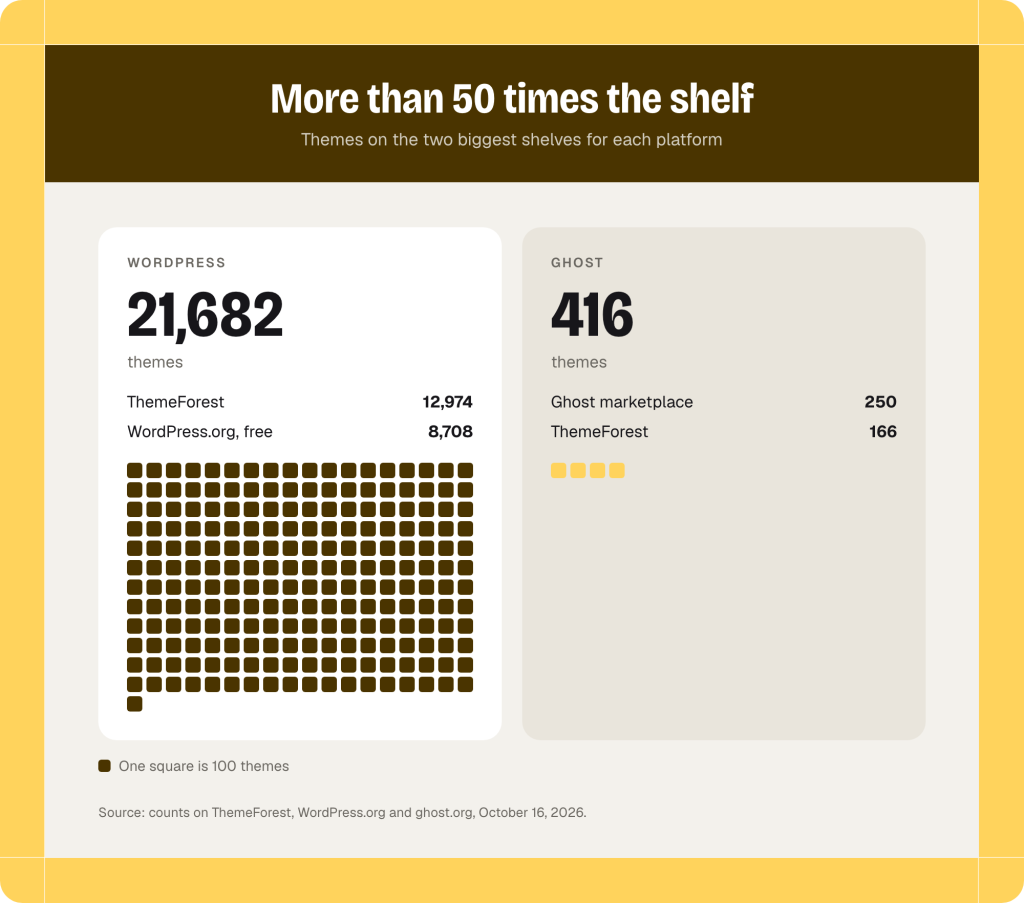
The problem with Ghost is how niche it is. It has no plugin system, only integrations, so a design means a theme, and themes are mostly paid. We analyzed the official Ghost theme marketplace on October 16, 2026, and it lists 250 themes: 18 free ones from Ghost, 4 free third-party ones and 228 paid ones at $35 to $149, with $89 in the middle. The bestselling WordPress magazine themes on ThemeForest cost $59, and WordPress.org alone has 8,708 free themes. Add 12,974 WordPress themes on ThemeForest, against 166 Ghost themes there, and the WordPress shelf is more than 50 times bigger.

Against Ghost, WordPress wins on themes and freedom, and the two are even on the blogging basics.
| WordPress | Ghost | |
|---|---|---|
| Built for blogging | Since 2003 | Since 2013 |
| Newsletter | Free plugin | Built in |
| Paid members | Plugins | From $29, no Ghost fee |
| Themes | 21,000+, 8,708 free | 250, 22 free |
| Export | Full WXR file | JSON and members CSV |
| Starts at | Free software | $15, or self-host |
Is Wix or Squarespace good for blogging?
Wix and Squarespace are fine for a business site with a blog page, and weak as the home of a serious blog, mostly because leaving is hard.
Wix plans cost $17 to $159 a month billed yearly, and the free plan shows Wix ads (Wix). Email marketing is a separate plan with 200 free emails a month (Wix Help Center). Post addresses carry a /post/ prefix you can rename but not remove, and an existing site cannot switch to another template. The deal breaker is in the help center in plain words: blog posts cannot be exported to other platforms.
Squarespace starts at $19 a month and has no free plan (Squarespace). Email Campaigns is billed separately and cannot send without it, and selling access to posts costs a 7% fee on Basic, down to 0% on Advanced (Squarespace fees). Third-party designers are not allowed to sell templates, and the structured data Squarespace generates cannot be edited. The export is a WordPress XML file with one blog page; extra blog pages, products, audio and video blocks, drafts and custom CSS stay behind.
WordPress vs the site builders
Against Framer, Webflow, Wix and Squarespace, WordPress wins every row that decides how far a blog can grow: newsletters, members, themes and export.
| WordPress | Framer | Webflow | Wix | Squarespace | |
|---|---|---|---|---|---|
| Built for blogging | Since 2003 | No | No | Blog app | Blog page |
| Newsletter | Free plugin | Outside tool | Outside tool | Separate app | Paid add-on |
| Paid members | Plugins | Third party | Third party | Pricing Plans | 7% to 0% fee |
| Themes | 21,000+ | Templates | Templates | No switching | First party |
| Export | Full WXR | CMS plugin | CMS as CSV | No posts | 1 blog page |
| Starts at | Free software | $10 | $25 with CMS | $17 | $19 |
What WordPress costs you
Control comes with upkeep: on WordPress, security, plugins and speed are your job. I have written about each of these separately, so here is the short version.
Security first. WordPress has always been a large attack surface and always will be, because it runs third-party code by design. Security is not an event you complete; it is a maintenance habit.

Plugins carry most of that risk. Patchstack recorded 11,334 new WordPress vulnerabilities in 2025, and for the most heavily targeted ones it measured a weighted median of five hours from disclosure to the first exploitation attempt. Every plugin you add is code someone has to keep patched.

Then speed. In August 2026, 48.7% of WordPress origins passed all three Core Web Vitals on mobile (HTTP Archive). Loading is largely decided by the theme and the host, so the theme you choose shows up in your scores.

Upkeep is the bill for owning the place. Hosted platforms pay it for you and charge you back in limits, add-ons and a harder exit.
Questions people ask
What is the best free blogging platform?
For a hobby blog, the free plan on WordPress.com costs nothing and runs WordPress. Self-hosted WordPress is free software too, but you pay for hosting and a domain, and that is the version this post recommends.
Which blogging platform is best for making money?
The best platform for making money keeps your email list and takes the smallest cut. Ghost Publisher takes no transaction fee beyond Stripe. On WordPress the cut depends on the plugin: Jetpack Newsletter takes 10% on its free plan and 2% on Complete. Substack keeps 10%, and Squarespace charges 7% on its Basic plan.
Can I move my blog off Wix or Squarespace later?
Moving a blog off Wix or Squarespace is hard. Wix says blog posts cannot be exported to other platforms. Squarespace exports one blog page to a WordPress XML file and leaves products, extra blog pages and custom CSS behind. If moving later is even a possibility, start somewhere that exports all your content.
Is Ghost better than WordPress for SEO?
Ghost is not better than WordPress for SEO by default; it is more complete out of the box. Ghost ships meta titles, canonical URLs, a sitemap and structured data (Ghost SEO). WordPress core gives you title tags, canonical URLs and, since version 5.5, a sitemap, while meta descriptions and structured data come from your theme or an SEO plugin. The difference is how far you can go past the defaults: on WordPress every part of the output can be changed, on Ghost you work within what the theme and settings expose.
So which blogging platform should you pick?
Pick by how serious the blog is.
For a blog you need control over and take seriously: WordPress. For stories about the weekend you went to the mountains for mushrooms: anything else will do.
If a paid newsletter is the whole business and you never want to touch a plugin, Ghost is the sensible second choice. If you go with WordPress, your next decision is a theme built for long reading. That is what we make: our blog and magazine themes are in the jkdevstudio theme catalog, each with a live demo.