In August 2026, 48.7% of WordPress origins passed all three Core Web Vitals on mobile. Duda passed on 85.96% of its mobile origins. Both figures come out of the same dataset, the HTTP Archive Core Web Vitals Technology Report, and the distance between them is 37 percentage points, across 45,113 Duda origins and 2,752,367 WordPress ones.
I build and sell WordPress themes for a living, which makes the rest of this awkward. The usual response to a number like that is a caching plugin and a CDN, and I have recommended both. On a site whose theme puts a stack of stylesheets and a full font family in front of the first paint, they buy back less than the invoice suggests.
- Overall, mobile
- 48.7% of WordPress origins
- Interaction, mobile
- 90.8%, level with Wix
- Loading, mobile
- 55.8% good LCP
The gap is real and the comparison is stacked
Take the unflattering version of that comparison first, because the 37 points get quoted without it. Passing means an origin whose 75th percentile CrUX value is good on LCP, INP and CLS at once, split by device, all countries and all ranks. The smaller of those two populations, roughly 61 times smaller, is a managed platform holding mostly small brochure sites behind a single CDN. The larger is the long tail of the web, with news sites, WooCommerce stores and ad-funded publishing inside it.
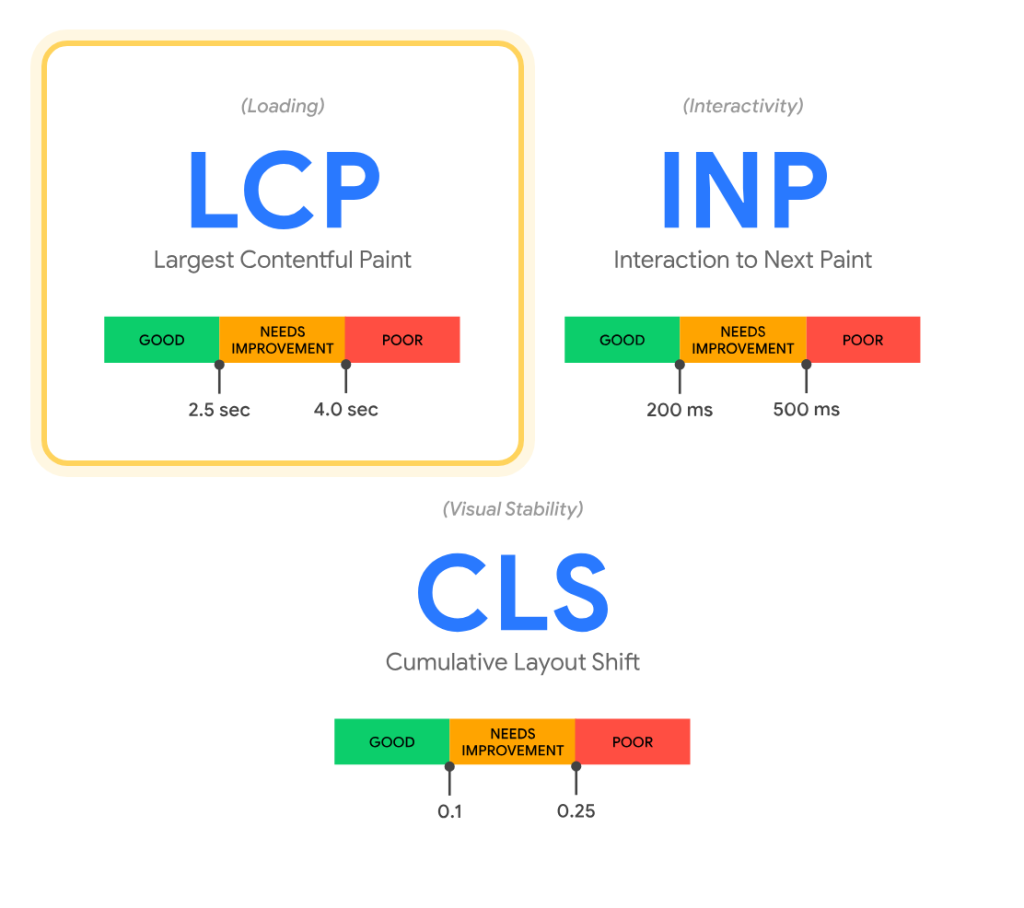
Match the device and the dataset and the picture shrinks fast. Against every origin the same crawl covers, WordPress trails by about four points, 48.7% against 53.0% for all mobile origins in August 2026.
HTTP Archive also runs Lighthouse on that crawl, and there the median mobile performance score is 0.435 for WordPress and 0.53 for Duda. That is a gap of 9.5 Lighthouse points where the field shows 37, and WordPress sites built with the site editor score 0.62 in the same runs, above Duda.
Most of what separates the two in the field lives in hosting, networks, geography and who chooses which stack, and none of that is written in a template file.
It does not follow that the gap is imaginary.
Half of a very large number is still a great many slow sites, and the November 2025 reading of the same series, 46.28% on mobile, is where every headline about WordPress failing Core Web Vitals came from. The Chrome UX Report release notes for August 2026 put the whole web at 55.6% of origins passing all three, but that figure pools mobile and desktop, so it does not sit against the mobile-only numbers above.
Interaction is the part WordPress passes
WordPress passes INP on 90.8% of the mobile origins that register enough interactions to be measured, level with Wix and about six points behind Squarespace. That figure is mobile only, and it comes from 2.02 million of 2.75 million WordPress mobile origins, so roughly 27% of them produce no INP reading at all.
The whole spread between platforms on INP is about seven points. On the overall pass rate it runs from 48.7% to 85.96%. Whatever separates WordPress from the platforms above it happens before the visitor taps anything.
| Metric, mobile | WordPress origins | All crawled origins |
|---|---|---|
| All three Core Web Vitals | 48.7% | 53.0% |
| Largest Contentful Paint | 55.8% | 65.8% |
| First Contentful Paint | 43.6% | 58.2% |
| Time to First Byte | 23.5% | 45.8% |
What fails sits between the request and the first useful pixel. Layout stability is not the problem either, since WordPress passes CLS on 87.2% of mobile origins.
The last row is a different problem and I will come back to it. The two above it are settled before a plugin has done anything interesting, by what sits in the head and how the largest image is handled. Both are written in the template.
What the theme decides
A stylesheet in the head blocks rendering until it downloads. The render-blocking resources audit in Lighthouse counts a stylesheet link as blocking unless it carries a disabled attribute or a media attribute that does not match the device, and a script in the head as blocking unless it carries defer or async.
Across the crawled web, 13% of desktop pages and 15% of mobile pages pass that audit, per the Performance chapter of the Web Almanac 2025. The audit fires above a savings threshold, so a page can fail it by a hair or by a second. Waiting on files the template handed it is the ordinary state of a page.
The ways a theme causes that are not exotic. I have shipped most of them.
- Stylesheets in the head that load on every page, whether or not the page uses what is inside them.
- A builder bundled into the theme, so its CSS and JavaScript arrive on a page built from two blocks.
- Font files picked for the demo rather than for the design the buyer ends up shipping.
- A hero image with no width, no height and no priority hint, which is both the LCP element and the layout shift.
- Option panels that enqueue their assets everywhere, because conditional loading is work nobody can see.
Fonts
The median mobile page requests four font files, six at the 75th percentile and nine at the 90th, and fonts account for 122 KB of the median mobile home page, per the Page Weight chapter of the Web Almanac 2025. The mechanism is in the chapter itself: “Every unique weight (bold, light, thin) and style (italic) of a typeface requires a separate file download, meaning a single font family can quickly balloon into several hundred kilobytes of additional data.”
Hints are the other half. 87% of mobile pages load at least one web font, 22% preconnect to wherever it comes from, and 16% preload one, per the Performance chapter of the same almanac. A theme author picks the family and the file count, and decides whether the preconnect hint exists at all.
It is one line in the head, and a buyer clicking through demos has no way to see whether it is there.

Images
Images are the LCP element on 76% of mobile pages, and only 17% of mobile pages with an image LCP set fetchpriority="high" on it. Meanwhile 62% of mobile pages fail to set dimensions on at least one image. Template code decides both, and the second is two attributes. What the media library happened to hold is a separate problem.

Enqueue everything, everywhere
Elementor documented this habit about itself. Before version 3.24, in the September 2024 developer update, “each time a new widget was added, its style was added to every page”. Splitting that CSS took Elementor Pro from 471 KB to 9 KB and free Elementor from 267 KB to 61 KB, on sites that had not already turned on improved CSS loading. That saving is all stylesheet weight, and it describes a state the product left behind two years ago. The company also noted that no single page gets 668 KB lighter, that figure being the Pro and the free saving added together.
The frontend performance field guide for 6.9, published by Make WordPress Core in November 2025, measured the same habit in themes: classic themes add much more CSS than a page may need, and loading block styles on demand cut per-theme CSS by an average of 45% on the default Sample Page, 26% on a page carrying 23 different blocks. In the lab runs behind the guide, the average LCP improvement was 4% for classic themes and 25% for block themes.
The fix inside a theme is a condition around an enqueue, and it has been available for as long as the block editor has:
if ( has_block( 'core/gallery' ) ) {
    wp_enqueue_style( 'theme-gallery', get_theme_file_uri( 'assets/gallery.css' ), array(), '1.0' );
}
What core paid for that CSS saving
That field guide also reports server response time for Twenty Twenty-One going from 24.68 ms to 27.63 ms, about 12% worse, because WordPress can no longer stream the response while it works out which styles a page needs. These are lab measurements on a local install with LCPs in the 200 ms range, not field results.
Your server decides when the first byte arrives. Your theme decides how much work arrives after it.
Why theme authors leave it alone
Every feature in a theme is a line on the sales page. Conditional loading is not. Nobody has ever bought a theme because it declined to load a stylesheet, and the demo is the product: a buyer clicks through the prebuilt demos and judges whichever one renders fastest on the third click, which rewards loading everything up front. The marketplace ranks a theme by feature count and by sales, never by page weight.

I have shipped this mistake. Enqueueing every asset on every page is the cheapest way to make a demo that never breaks. It takes an afternoon to decide, and every visitor to every site built on that theme pays for that afternoon.
A multipurpose theme is the extreme case. One codebase has to be a restaurant, a law firm and a gym, so the assets for all three ship together and the buyer who wanted the law firm carries the other two.

Astra is the counter-example, and it sits in the same dataset. The theme people install to be fast passes on 40.9% of its mobile origins in the August 2026 crawl, below the WordPress mobile average of 48.7%, with a good TTFB on 17.0% of them. Hello Elementor passes on 38.1%, GeneratePress on 50.8%, Beaver Builder on 54.0% and Bricks on 55.7%, all mobile. The theme marketed as lightweight is not a pass rate. It is one input into a page that a builder and a host also get to write.
The theme marketed as lightweight is not a pass rate.
The cache fixes the part the theme did not break
Back to the bottom row. WordPress passes TTFB on 23.5% of mobile origins, against 45.8% for all origins, 73.8% for the 45,113 Duda origins and 81.9% for Shopify. TTFB sits inside LCP. It is the metric WordPress fails hardest, and no theme has ever fixed one. Part of that 37-point gap was bought with a server and a CDN. That is the honest case for managed hosting, and the part of this I am not selling.
Caching is where I have to give ground. A page cache repairs server response time and leaves render-blocking assets exactly where they were, except that nobody sells a plain page cache any more. The plugins now bundle unused-CSS removal and JavaScript delay. That is the work of the theme, done again by a plugin on every page build. In its own tests WP Rocket reports a Divi page moving from 64 to 100 out of 100 on the performance score, and an Elementor page from 75 to 99.
| Cache | Optimizer | Theme | |
|---|---|---|---|
| Slow server response | Fixed | Fixed | Out of reach |
| Render-blocking CSS in the head | Untouched | Stripped after the fact | Never enqueued |
| Font files per page | Untouched | Sometimes trimmed | Chosen up front |
| Priority of the LCP image | Untouched | Sometimes set | Set in the template |
| Who pays for it monthly | You do | You do | Bought once |
The widest gap is inside WordPress
Split the WordPress population by what built the page and the numbers separate harder than the platform comparison did. Site editor origins pass on 63.7% and Elementor origins on 36.8%, both mobile, both August 2026. That is a 27-point spread inside WordPress against roughly four points between WordPress and the whole crawled web.
That number needs its caveat in the same paragraph. Site editor origins are newer and smaller sites, more often built by developers, so part of that spread measures who builds on what, and only part of it measures the code.
Byte weight tells a messier story than I would like. At the median a site editor origin carries 374 KB of JavaScript and 1,941 KB of total page weight, against 675 KB and 2,853 KB for an Elementor origin, and 835 KB of JavaScript for a WPBakery one. Two populations of different ages and complexity sit behind those medians, so nothing here is the same page built twice. Elementor and Divi origins sit within 30 KB of the plain WordPress JavaScript median of 648 KB, so the separation comes from total weight and images.
Home page detection is all the crawl does, across roughly 2.8 million public origins and not the install base. On that measure Elementor is detected on about a third of the WordPress mobile origins the HTTP Archive crawls, 33.25% in the August 2026 crawl. For a large share of the web, the builder layer is the interface of WordPress.
The CMS chapter of the Web Almanac 2025 words the risk carefully: page builders “often generate more complex DOM structures and larger CSS and JavaScript bundles, raising performance risks at scale”.
In a comparison published by WP Rocket, article last updated June 2026, the same sample page built with the block editor scored 89 out of 100 with a 3.5 second page speed figure and a 2.2 second LCP, while the Elementor build scored 81, 5.0 seconds and 3.1 seconds, and the WPBakery build scored 80 at the same 5.0 seconds. They built one sample page with identical content and design, on the same hosting, theme, images and plugins, and measured it with GTmetrix against an iPhone 14 profile on a server in France. The article carries no test date and never states whether caching was on. Only the builder varied, so it measures builders, and the company that ran it sells the caching plugin that closes the gap.

What I check before I trust a theme
None of this needs a lab. Four checks on the demo site, in the browser you have open:
- Open a demo page, view source, and count the stylesheet links in the head that carry no media attribute. That is the render-blocking budget you inherit on day one.
- Count the font files the page requests, then count the weights the design uses. If the first number is larger, it stays larger for as long as the theme is installed.
- Look at the hero image for a width, a height and a priority hint. Those are one line each, and they prevent the shift you would otherwise pay a plugin to paper over.
- Load a page that uses none of the headline features and see what still gets enqueued. A slider stylesheet on a page with no slider tells you how the theme was written.
The numbers have been moving the right way. The WordPress mobile pass rate went from 43.44% in June 2025 to 48.74% in August 2026, a gain of 5.3 points, while Duda gained 2.3 over the same stretch, so the gap closed from 40.2 points to 37.2. It wobbles: between July and August 2026 WordPress gave back seven tenths of a point. Fourteen months of work across core, plugins and themes bought about five points, and one ordinary month took back a seventh of it.
Last updated